Reading time: ~10 minutes
Almost every serious web application — an online store, a booking system, an internal portal — ends up with the same basic shape: something users see, something that does the thinking, and somewhere to keep the data. That shape is the three-tier architecture, and it has stayed popular for decades because it is easy to reason about, easy to scale, and (when built well) easy to secure.
In this post, I’ll walk you through what the three tiers are, how to map them onto AWS services, and the security controls that turn a working app into a secure one.
What Is a Three-Tier Architecture?
A three-tier application splits responsibilities into three logical and physical layers:
- Presentation tier (web) — The user interface. It serves HTML, CSS, JavaScript, and images, and forwards user actions to the application tier.
- Application tier (logic) — The brain. It runs business logic: validating orders, calculating prices, authenticating users, and calling other services.
- Data tier (database) — The memory. It stores and retrieves data such as customers, products, and orders.
The key rule: each tier talks only to the tier next to it. Users never reach the database directly, and the web tier never runs raw SQL. That separation is what gives you independent scaling, cleaner deployments, and a much smaller attack surface.
Mapping the Tiers to AWS
Here is a proven, production-style layout:
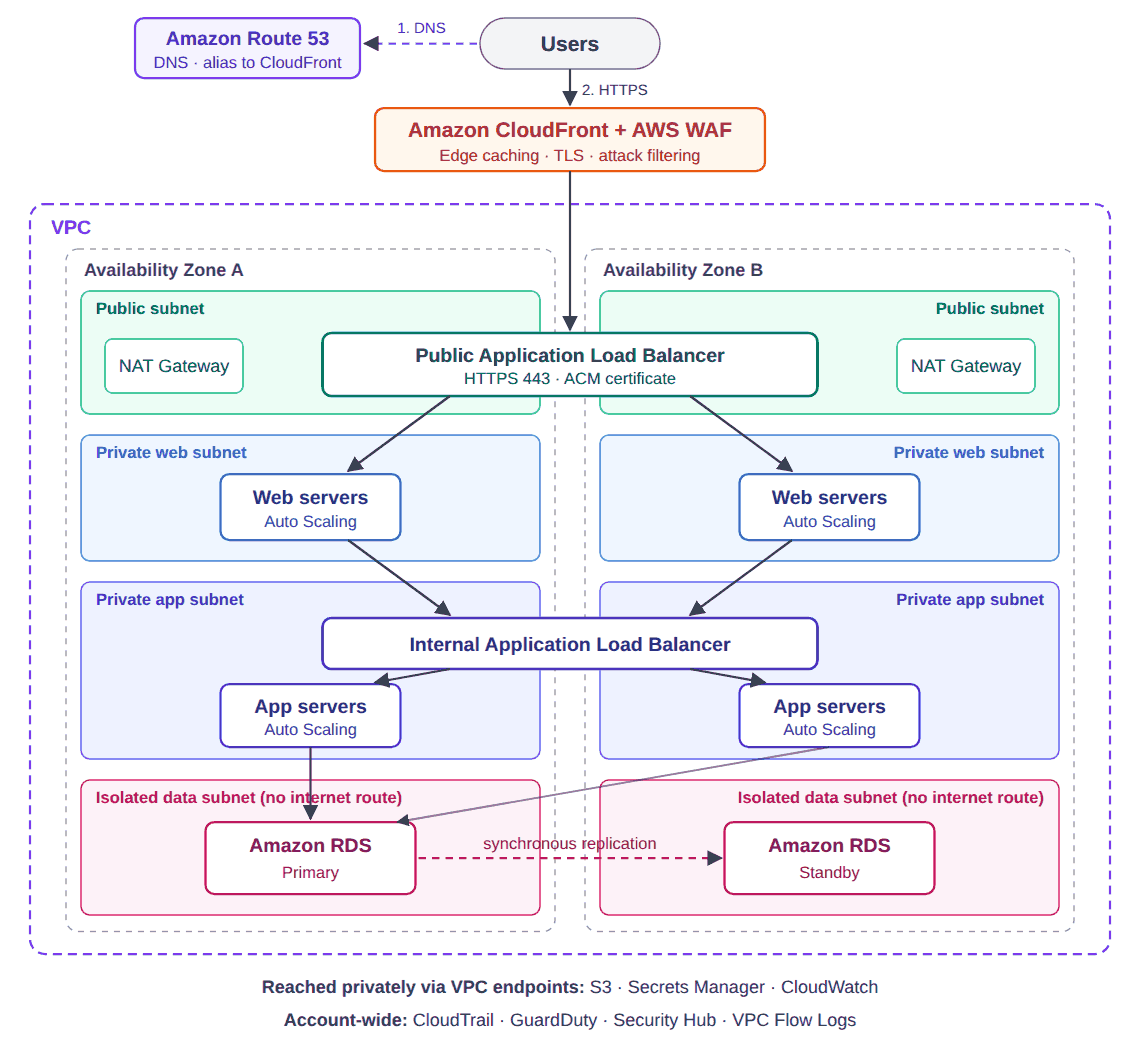
1. Networking foundation: the VPC
Everything lives inside a Virtual Private Cloud (VPC) spread across at least two Availability Zones for high availability. Create four groups of subnets:
- Public subnets — only the internet-facing load balancer and NAT Gateways.
- Private web subnets — web servers. No public IPs.
- Private app subnets — application servers. No public IPs.
- Isolated data subnets — the database. No route to the internet at all.
Private servers reach the internet (for patches and package installs) through a NAT Gateway, and reach AWS services like S3 privately through VPC endpoints.
2. Presentation tier
- Amazon Route 53 hosts the domain’s DNS and points it at CloudFront with an alias record (alias queries to AWS resources are free). Enabling DNSSEC signing on the hosted zone protects visitors from DNS spoofing.
- Amazon CloudFront caches static content close to users and absorbs traffic spikes.
- AWS WAF attached to CloudFront or the ALB blocks common attacks such as SQL injection, cross-site scripting, and bad bots.
- An internet-facing Application Load Balancer (ALB) terminates HTTPS using a free certificate from AWS Certificate Manager (ACM).
- Web servers run in an Auto Scaling Group (EC2) or as containers on Amazon ECS/EKS. For a purely static frontend (e.g., React), S3 + CloudFront can replace the servers entirely.
3. Application tier
- An internal ALB distributes traffic from the web tier to the app servers — it has no public endpoint.
- App servers run in their own Auto Scaling Group or ECS service, scaling on CPU, memory, or request count.
- Secrets such as database passwords are pulled at runtime from AWS Secrets Manager, never hard-coded or stored in environment files.
- Optional: add Amazon ElastiCache (Redis) for sessions and caching to take load off the database.
4. Data tier
- Amazon RDS (MySQL, PostgreSQL) or Amazon Aurora in Multi-AZ mode for automatic failover.
- Read replicas for read-heavy workloads.
- Encryption at rest with AWS KMS and encryption in transit with TLS.
- Automated backups and point-in-time recovery enabled, with retention that matches your business requirements.
Design Decisions and Trade-offs
A reference diagram tells you what to build. The real architecture work is deciding which option fits your workload, budget, and team. These are the choices I’d think through before building.
NAT Gateway vs. VPC endpoints
A NAT Gateway costs about $0.045 per hour (roughly $33 a month) plus $0.045 for every GB it processes, and for high availability you want one per Availability Zone. That is around $66 a month before a single byte of traffic.
Gateway VPC endpoints for S3 and DynamoDB are free, so there’s no reason not to add them. They also keep that traffic off the internet path entirely. Interface endpoints (for Secrets Manager, ECR, CloudWatch, and so on) cost money per hour, but they can still be cheaper than pushing heavy traffic, such as container image pulls, through a NAT Gateway. In dev environments, a single NAT Gateway is a reasonable saving; in production, it becomes a single-AZ point of failure.
EC2 Auto Scaling vs. ECS on Fargate
- EC2 gives you full control and is usually cheaper for steady, predictable load, but you own OS patching, hardening, and AMI pipelines.
- Fargate removes the servers from your responsibility: no OS to patch, no SSH to worry about. You pay a higher unit price for that.
For a small team, operational burden is a security issue: unpatched servers are where security debt quietly piles up. That makes Fargate worth serious consideration even at a higher cost.
RDS vs. Aurora
- Amazon RDS is simpler and cheaper for small or steady workloads. Multi-AZ failover typically completes in one to two minutes.
- Amazon Aurora replicates storage across three Availability Zones, fails over faster (typically under a minute), and supports up to 15 read replicas, at a higher price.
Start with RDS unless you already know you need Aurora’s failover speed or read scale. Migrating later is well supported.
Do you even need a web tier?
If your frontend is a single-page app (React, Vue, Angular), you can often drop the web servers entirely: host the static files in S3 behind CloudFront with Origin Access Control, and let the browser call the application tier’s API directly. Fewer servers mean fewer things to patch, monitor, and defend.
Security: Defense in Depth
A three-tier design is naturally layered, so security should be layered too. These are the controls that matter most.
Security groups that chain tier to tier
Security groups are your most powerful tool. Instead of allowing IP ranges, reference the security group of the tier in front:
| Security group | Inbound rule | Source |
|---|---|---|
alb-public-sg | 443 (HTTPS) | 0.0.0.0/0 |
web-sg | 80/443 | alb-public-sg |
alb-internal-sg | 80/443 | web-sg |
app-sg | App port (e.g., 8080) | alb-internal-sg |
db-sg | 3306 / 5432 | app-sg |
With this chain, the database accepts connections only from the application servers — even a compromised web server can’t reach it directly.
No SSH, no bastion
Skip port 22 entirely. Use AWS Systems Manager Session Manager for shell access. It needs no open inbound ports, uses IAM for authentication, and logs every session.
Least-privilege IAM
Give each tier its own IAM role with only the permissions it needs. The app tier might read one secret and write to one S3 bucket; the web tier might need nothing at all.
Encrypt everything
- HTTPS from the user to CloudFront and ALB.
- TLS between the app tier and the database.
- KMS encryption on EBS volumes, RDS, S3, and backups.
Visibility and detection
- VPC Flow Logs to see who is talking to whom.
- AWS CloudTrail for every API call in the account.
- Amazon GuardDuty for threat detection.
- AWS Security Hub and AWS Config to catch misconfigurations like public S3 buckets or open security groups.
- CloudWatch alarms on errors, latency, and unusual traffic.
Patch and scan
Use Amazon Inspector to scan EC2 instances and container images for vulnerabilities, and Systems Manager Patch Manager to keep operating systems up to date.
Threat Model: What If the Web Tier Is Compromised?
Controls only matter if they hold up under attack. So assume the worst: an attacker exploits a vulnerable library and gets code execution on one of your web servers. How far can they get?
- Can they reach the database? No.
db-sgonly accepts traffic fromapp-sg, so the web server is simply not allowed to connect. - Can they call the application tier? Yes, through the internal load balancer, because that’s its job. This is why the application tier must authenticate and validate every request instead of trusting anything that comes from “inside” the VPC.
- Can they steal AWS credentials? They can try the instance metadata service. Enforce IMDSv2 with a hop limit of 1, and keep the web tier’s IAM role nearly empty, so stolen credentials are worth very little.
- Can they send data out? By default, security groups allow all outbound traffic, and the NAT Gateway gives a path to the internet. Restrict egress to only the destinations each tier needs. For stricter environments, use AWS Network Firewall with a domain allowlist.
- Would you notice? GuardDuty flags unusual behavior such as calls to known malicious hosts or instance credentials used from outside AWS, and VPC Flow Logs show exactly which connections were attempted.
The goal isn’t to make compromise impossible. It’s to make sure one compromised server is a contained incident, not a data breach.
Scaling and High Availability
Because each tier is independent, you scale exactly where the pressure is:
- Holiday traffic spike? Scale out the web tier.
- Heavy report generation? Scale the app tier.
- Slow queries? Add a read replica or ElastiCache.
Running every tier across two or more Availability Zones means losing one of them doesn’t take your application down. For disaster recovery, copy snapshots to a second region and keep your infrastructure defined in code so you can rebuild quickly.
Build It as Code
Clicking through the console is fine for learning, but production environments should be built with Infrastructure as Code — Terraform, AWS CloudFormation, or AWS CDK. IaC gives you repeatable environments (dev, staging, prod), peer-reviewed changes, and a fast path to recovery.
A typical Terraform layout:
modules/
  vpc/
  alb/
  web-tier/
  app-tier/
  rds/
envs/
  dev/
  prod/
Pair it with a CI/CD pipeline (GitHub Actions, GitLab CI, or AWS CodePipeline) that runs terraform plan, security scanners such as Checkov or tfsec, and requires approval before apply.
Lessons from the Field: When My Own WAF Blocked Me
While publishing this very post, WordPress refused to save it with a vague error: “Updating failed. The response is not a valid JSON response.”
My site sits behind CloudFront and AWS WAF with the AWS managed Core rule set. The browser’s network tab showed the real story: the save request was getting a 403 from CloudFront, not an error from WordPress. The culprit was the managed rule SizeRestrictions_BODY, which blocks any request body larger than 8 KB. The WordPress editor sends the whole post as JSON when you save, so short drafts saved fine, but this article, at several times that size, was blocked every time.
What I took away from it:
- Managed rules are generic defaults, not tailored to your app. Test them against your real workflows: long forms, file uploads, API payloads, admin tools.
- Start new rule groups in Count mode. Review what would have been blocked before switching to Block.
- Fix it with the narrowest possible exception. Rather than disabling the rule site-wide, use a scope-down statement that excludes only the specific path that needs larger bodies (here, the WordPress REST API used by the editor), and keep the rule active everywhere else.
- Turn on WAF logging. A 403 with no logs leaves you debugging the application; a WAF log tells you which rule fired within seconds.
Security controls that break legitimate users tend to get switched off entirely. Tuning them carefully is part of the job.
Common Mistakes to Avoid
- Putting the database in a public subnet — or enabling “publicly accessible” on RDS.
- Opening security groups to 0.0.0.0/0 on anything other than the public load balancer.
- Storing credentials in code or AMIs instead of Secrets Manager.
- Running in a single Availability Zone to save a little money.
- Skipping logging until after an incident — when it’s too late.
Final Thoughts
The three-tier architecture is simple on paper, but the details decide whether it’s resilient and secure. Isolate each tier in its own subnets, chain security groups so traffic flows only one hop at a time, encrypt everything, remove direct server access, and build the whole thing as code.
Get those fundamentals right and you’ll have a foundation that scales from your first hundred users to your first million — without leaving the door open along the way.
Designing or securing your own three-tier application? Feel free to reach out. I’m happy to help.